A browser game is a video game that runs inside a web browser such as Chrome, Safari, Firefox or Edge. You open a link, the browser retrieves the game's files and the game starts on the page. There is normally no separate installer, app-store account or operating-system setup process.
That simple definition covers a surprisingly wide range of experiences. Browser games include word puzzles, card games, physics toys, strategy games, multiplayer worlds and short interactive experiments. Some resemble ordinary websites. Others draw every frame to a canvas and behave more like a traditional downloadable game.
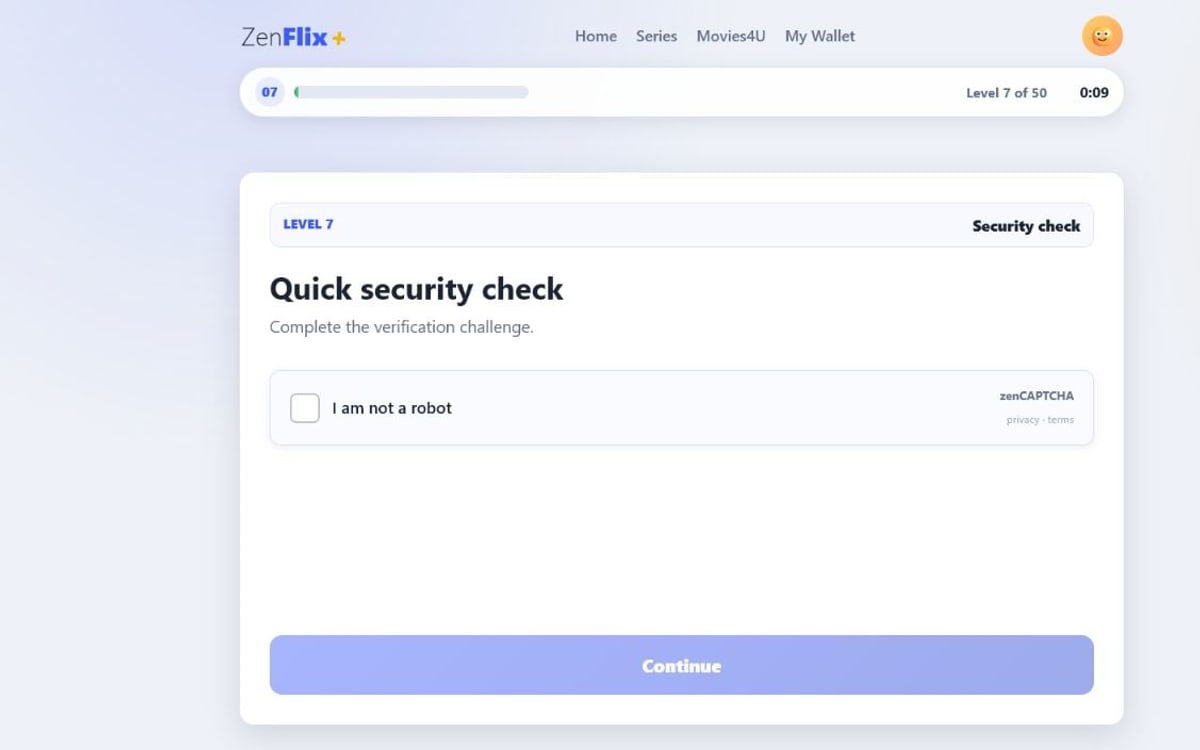
At ZenVisionGames, we build small browser games designed to begin quickly and work on desktop and mobile. Our first release, Cancel My Subscription, uses forms, animation, drawing, dragging, sound and 2D physics across its playable levels. It is a useful example of how broad the phrase "browser game" has become.
Want the practical version? Open the game and play directly in your browser.
Play Cancel My SubscriptionThe short answer
Browser games are websites with game rules. HTML provides structure, CSS controls presentation and animation, and JavaScript handles input, state and game logic. A game may also use Canvas for 2D drawing, WebGL for hardware-accelerated graphics, Web Audio for sound and browser storage for local progress. The browser supplies the runtime, so the player can usually start from a URL instead of installing an application.
Does a browser game really require no download?
"No download" is convenient shorthand, but it needs one clarification. Your browser still transfers the page's code, images, fonts and sounds from a server. It may keep some of those files in a cache so the next visit loads faster. What you normally avoid is a separate installation: no executable package, installation wizard or permanent application entry is required before play begins.
This distinction explains why a browser game can open immediately and still have a loading time. A tiny puzzle may transfer only a small collection of files. A graphically ambitious 3D game can transfer much more. Both run in the browser, but their startup cost, device requirements and data use can be very different.
The web also makes distribution unusually direct. A developer can publish one URL and update the files behind it, while players can share that same link. MDN's game development guide describes the web as a multiplatform game platform built on open technologies such as HTML, CSS and JavaScript.
How browser games work
When you visit a browser game, the browser first reads the page structure and styles. JavaScript then establishes the game state, listens for input and updates the screen. Some games advance only when the player acts; others run a continuous loop that updates movement and redraws animation frame by frame. MDN's anatomy of a video game describes the basic cycle as presenting a situation, accepting input, interpreting it, calculating the result and repeating until an end condition is reached.
The exact technology depends on the interaction. There is no requirement that one game use every browser API, and smaller games often benefit from using the simplest tool that fits each mechanic.
HTML and the DOM
HTML creates buttons, headings, forms, text fields and other interface elements. The browser represents those elements in the Document Object Model, or DOM, which JavaScript can change while the game runs. DOM-based interfaces are especially useful for games built around words, choices, documents or familiar website conventions because text remains selectable, responsive and accessible.
Cancel My Subscription deliberately looks like a streaming-service account page. That fiction is easier to maintain with real interface elements: checkboxes can split into more checkboxes, forms can reject a date, and a Cancel button can move away from the pointer. The joke comes from the behaviour, while the underlying page remains readable.
CSS for layout, feedback and animation
CSS determines where elements appear and how they respond to different screen sizes. It also handles many lightweight transitions: a pressed button can compress, a document can shake after rejection and confetti can fall across the screen. These animations do not always need a permanent game loop. The browser can animate them only when required.
JavaScript for rules and state
JavaScript connects the interface to the rules. It decides whether an answer is valid,
counts attempts, moves objects, starts timers and advances to the next level. For games
that update every frame, the browser's requestAnimationFrame() mechanism
schedules work in step with display redraws. Event-driven games can remain idle until a
click, key press or pointer movement occurs.
Canvas and WebGL for drawn graphics
The Canvas API provides a surface where JavaScript can draw 2D graphics. It suits particles, signatures, mazes and custom game scenes. WebGL goes further by exposing hardware-accelerated 2D and 3D rendering through the browser. A simple puzzle does not need WebGL, but the WebGL API allows web games to render complex scenes using the device's graphics capabilities.
Web Audio for responsive sound
The Web Audio API supports precise sound playback, mixing and effects. A browser game can trigger a click when a ball hits a pin, a miss sound when it lands in the wrong slot and a celebration when the player succeeds. Browsers generally require a user interaction before audio begins, which is why many games initialise sound after the first click or tap.
How the same browser game works with mouse and touch
A web game may receive input from a mouse, touchscreen or stylus. Pointer Events provide one model for those different devices. Instead of maintaining completely separate mouse and touch mechanics, a game can respond to pointer movement, pressure and release while still adapting target size and layout for the available screen.
That common input model does not make a game mobile-friendly by itself. A finger covers more of the screen than a mouse cursor. Hover instructions do not exist on touchscreens. Browser scrolling can compete with a drawing or dragging gesture. Text that works beside a wide desktop game board may need to move above it on a phone. Responsive browser-game design therefore changes layout and interaction boundaries, not merely the scale of the entire desktop scene.
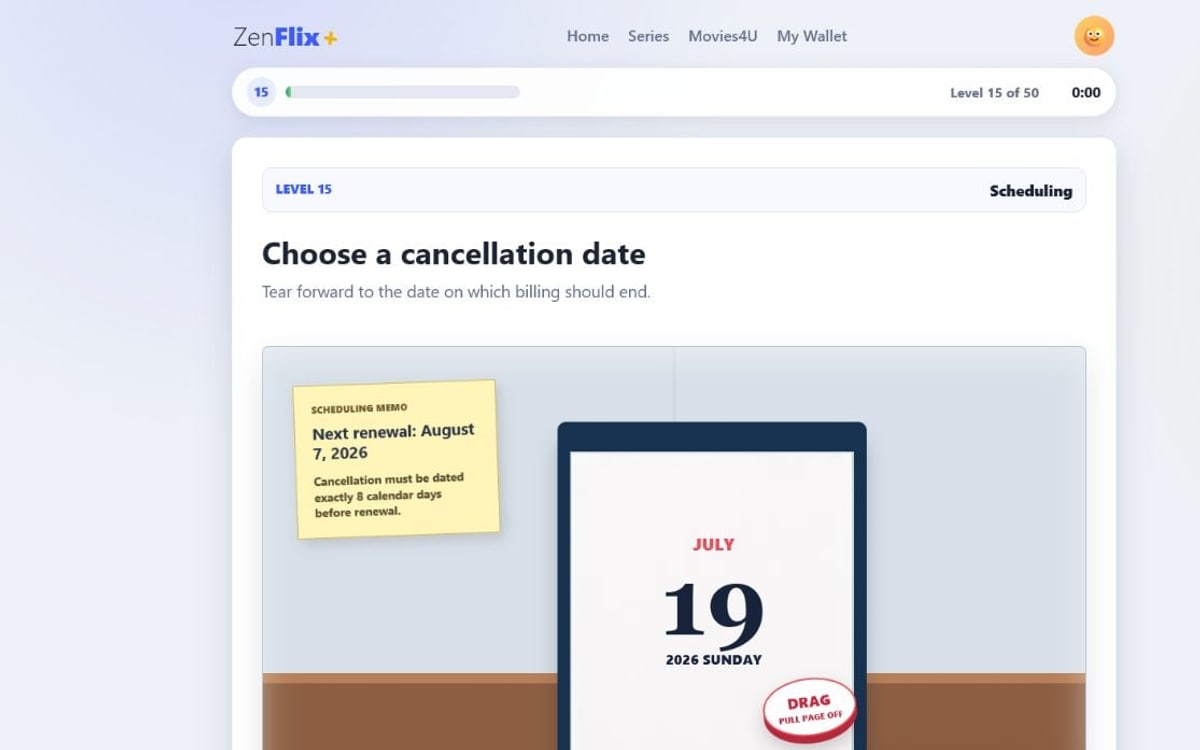
In our calendar level, the page follows the mouse or finger while the calendar frame remains fixed. The drag is constrained to the scene, and the page can be torn in any direction. Those details are part of the game mechanic, but they are also what prevent the browser itself from becoming the obstacle. MDN's Pointer Events guide explains how a single API represents mouse, pen and touchscreen input.
Can browser games save progress?
Yes. A browser game can store information locally on the player's device or send it to
an online account. The simpler local approach is useful for settings, unlocked levels
and small pieces of game state. The
Web Storage API
provides localStorage, which persists data for an origin after the browser
closes, and sessionStorage, which is scoped to a page session.
Local data is convenient but not the same as a cloud save. It normally stays with that browser profile and device. Clearing site data, using private browsing or switching devices may remove or bypass it. Games that need durable cross-device progress usually require a server and an account system.
Cancel My Subscription uses local browser storage for a deliberately unusual reason: one level records the signature a player draws, and a later identity check asks them to reproduce it. The saved information turns an earlier interaction into a future puzzle without requiring registration.
Are browser games the same as HTML5 games?
In everyday use, the terms overlap. "HTML5 game" became a popular label for games built with modern open web technologies rather than retired browser plug-ins. Strictly speaking, HTML is only one part of the stack. Most modern browser games combine HTML with CSS, JavaScript and one or more web APIs.
"Browser game" describes where the player runs the experience. "HTML5 game" usually describes the family of web technologies used to build it. For someone looking to play, the practical promise is similar: open a compatible browser and start from a link.
Browser games versus downloadable games
| Browser game | Downloadable game |
|---|---|
| Starts from a web link. | Usually requires a store or installer first. |
| Updates are delivered when the page loads. | Updates may be installed through a launcher or store. |
| Often works across several operating systems. | Builds may target specific operating systems or consoles. |
| Runs within browser security and performance limits. | Can receive deeper system and hardware access. |
| Easy to share with a URL. | Sharing usually points to a store page or download. |
Neither format is inherently better. Downloadable games are a strong fit for very large assets, extensive offline play, demanding hardware access and platform-specific features. Browser games are particularly effective when immediate access, broad device reach and easy sharing matter more than maximum graphical scale.
The main benefits and limitations
The clearest benefit of a browser game is reduced friction. A player can follow a link, try the game and decide whether it is worth more time. The same link can work in a message, social post or search result. Developers can publish improvements without asking every player to find and install a patch.
The tradeoffs are real. Browser differences still require testing. Mobile memory and battery limits matter. Large assets can make the first load slow. Local saves may not travel between devices. A game that depends on an online server may stop working when the connection disappears. Good browser games design around those constraints instead of pretending they do not exist.
Are browser games safe?
A browser game is not automatically safe or unsafe because of its format. Treat it as you would any other website. Check the domain, be cautious with unexpected downloads, avoid entering personal or payment information unless you trust the operator, and review permission requests for notifications, location, camera or microphone before accepting them. A game that claims to require an unrelated executable deserves extra scrutiny.
Our games run on the ZenVisionGames site, do not require an account and do not ask for real subscription credentials. ZenFlix+ and its cancellation process are fictional. The irritation is part of the game; the billing is not.
Try a modern browser game
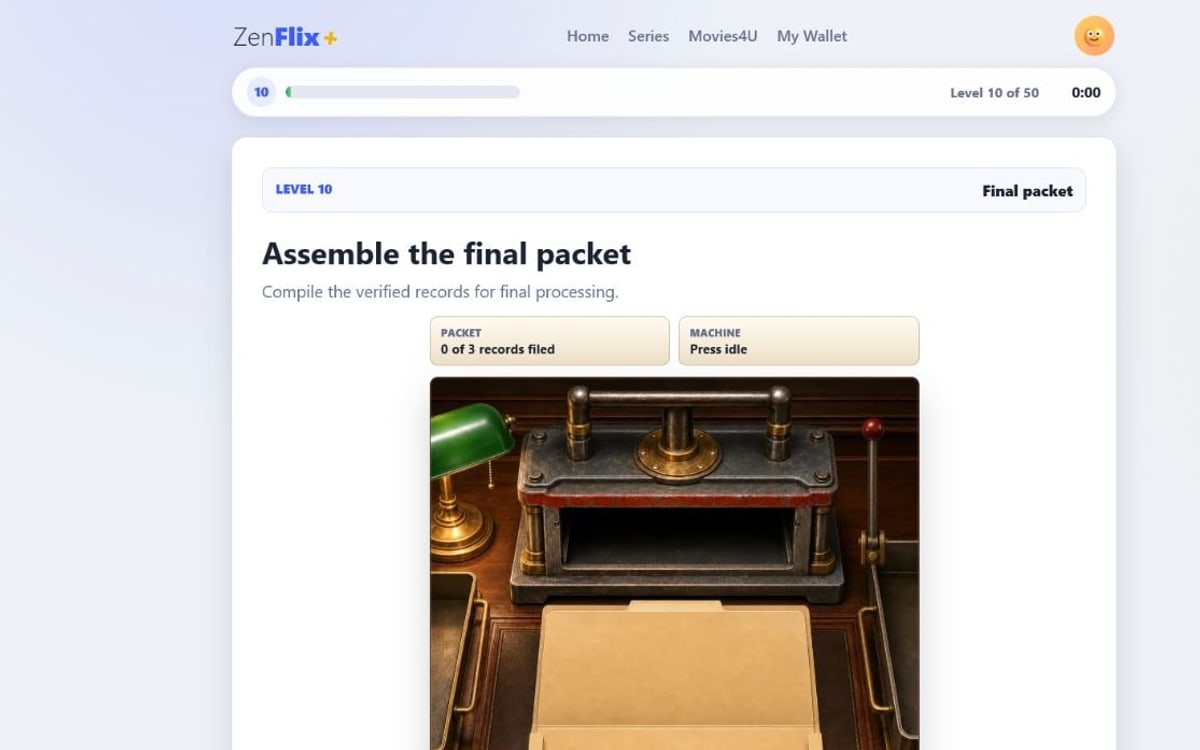
If you want to see these technologies working together, play Cancel My Subscription. Its current levels move from ordinary buttons and forms to a courtroom memory test, a multi-stage CAPTCHA, signature matching, document assembly, drag interactions, a slot machine and real-time 2D pachinko physics. It is free, requires no account and works on desktop, mobile and tablet.
To see how those mechanics became a deliberately difficult game, read our guide to making a hard game fun without making it unfair. You can also explore subscription dark pattern examples turned into game levels or start with the first development log about why cancelling a subscription is so hard. To discover more small interactive experiences, browse our hand-picked guide to games like Neal.fun.